
Price Gun Not Working? How to Fix Jams, Faint Print and Stuck Labels
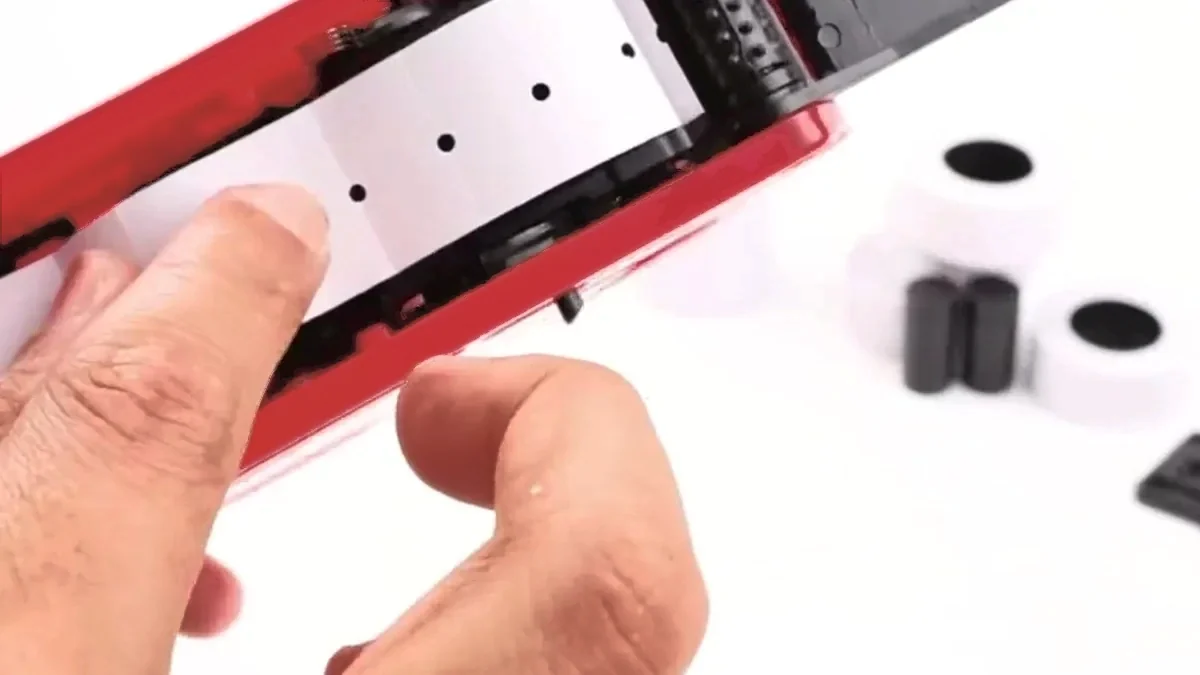
Most faults on a one-line labeller come from three places. Learning how to fix a price gun starts with the label path, because a roll loaded backwards or an inner gate left open stops the feed. Faint print comes from the ink roller, which needs priming or a swap. A label that shows half a price means the side knob is not pushed all the way in.
Each fix below takes a minute or two and needs no tools beyond the scraper from the kit. The steps are written for MX-5500 style guns, including the Easy Tag MX-5500EOS, and most one-line guns work the same way.
Find your fault fast
Match what you see to the likely cause, then jump to the fix.
| What the gun does | Likely cause | Quick fix |
|---|---|---|
| You squeeze, nothing comes out | Strip not on the sprocket teeth, or roll in backwards | Re-seat the holes, close the inner gate, check the roll feeds off the bottom |
| Labels pile up inside the gun | Strip threaded under the front guide | Pull the strip out through the front and re-thread it |
| Backing paper tears | Holes seated crooked, or strip pulled backward | Cut a clean straight edge and re-load |
| Two labels come out at once | Roll loose in the cradle, slack in the strip | Press the roll flat, pull the slack through the front |
| Print is grey or patchy | Roller not primed, crooked or dry | Print six on scrap, re-seat it, or fit a spare |
| Half a price prints | Side knob left half out | Push the knob all the way in, print a test label |
| Labels fall off the product | Dusty or damp surface, or gummy labels | Wipe the surface, store rolls somewhere cool |
How to fix a price gun that will not feed
A gun that will not feed has a strip that is not gripped by the sprocket wheel. Either the roll went in backwards, or the inner gate is open and the backing holes sit above the teeth instead of on them.
Open the top cover and look at the roll. The labels must come off the bottom of the roll and travel toward the front of the gun. If they come over the top, take the roll out, flip it and press it flat into the cradle.
Then release the two black catches and drop the base plate. Behind it is a small hinged flap called the inner gate. Seat the row of holes in the backing paper onto the sprocket teeth, close the gate over them, close the base plate and squeeze three or four times. The first squeeze or two can come out blank while the strip takes up tension. Our step-by-step MX5500 loading guide has the full sequence with every part named.
How to fix a jammed price gun
Stop squeezing as soon as labels bunch. Forcing the trigger through a jam tears the backing paper and turns a short fix into a full clean-out.
- Open the base plate and pull the strip back out through the front slot.
- Pick out loose labels stuck inside the label path. Use the scraper tip, never a metal blade.
- Cut the strip square. If the backing tore at the holes, trim the damaged part with scissors so you start from a clean edge.
- Re-thread through the front slot, not under the front guide. A strip under the guide feeds but never exits, so labels stack up inside.
- Peel off the first 25 labels of a new roll before you thread it. The leading edge of a fresh roll often has lifted corners, and those catch inside the gun.
Close the gate, close the plate and test on scrap paper before you go back to stock.
Why is my price gun printing faint or patchy?
Faint print points to the ink roller. A new roller prints grey until the ink spreads across all eight bands, and an old roller fades as the foam dries out.
Print five or six labels onto scrap paper and watch them darken. If one side stays pale, the roller sits crooked: pull it out by the tab and press it back until it clicks level. If ten scrap labels still look grey, the foam is spent. Open the ink flap, swap in a spare roller and prime it again. Our post on how to swap the ink roller walks through it step by step.
Two habits stop faint print coming back. Close the ink flap at the end of each session, because open air dries the foam. And never oil the gun: oil spreads to the roller and holds dust against the print head.
Why does the label show half a price?
The side knob is not pushed all the way in. A knob left half out lets the bands drift while you work, so part of the price slips out of line.
Pull the knob out, slide it to each band, set the character, then push it fully home. Print one test label after every change. If one character still prints broken, look for a paste of paper dust and ink on that band and wipe it with a dry cloth. No solvents.
Why do labels come out two at a time or fall off?
Two labels at once means the roll is spinning loose in the cradle and the strip has slack. Open the top cover, press the roll flat, and pull the loose backing paper back through the front.
Labels that fall off point to the surface or to storage. Wipe dusty, oily or damp packaging before you label it, and press each label on rather than tapping it. Rolls kept somewhere warm go gummy inside and start to jam, so store spares in a cool, dry place.
Check these five things before you send it back
A gun that will not feed can look broken when the cause is a loading step. Run these checks before you pack it up. Together they take about five minutes.
- The roll feeds off the bottom, toward the front of the gun.
- The inner gate is closed over the backing holes on the sprocket teeth.
- The strip exits through the front slot, not under the guide.
- The side knob is pushed fully in after you set the price.
- The ink roller is seated level and primed on six scrap labels.
If the gun still will not print after all five, contact the seller and list what you tried. That note helps them sort it out on the first reply.
How do you keep a price gun from jamming again?
A minute of care each week keeps most faults away. Wipe the label path with a dry cloth weekly, because paper dust drags on the backing strip.
Once a month, check the sprocket teeth for adhesive build-up and pick it off with the scraper tip. Keep the gun and spare rolls somewhere cool and dry with the ink flap shut. Our beginner’s guide to using the gun covers the rest of the daily routine. Keep to it and you will look up how to fix a price gun far less often.
When is a price gun too old or broken to fix?
Replace the gun when a part is broken. A cracked body, a snapped trigger, sprocket teeth worn smooth or a print band missing characters will not come right with cleaning or re-loading.
Replace it too when you can no longer buy labels or rollers that fit. An old gun built around a label size nobody stocks costs you more each time you hunt for refills.
Too old or broken to fix? A new kit costs less effort than another afternoon with a jammed gun. The red Easy Tag MX-5500EOS price gun arrives with 5,000 white labels, three ink rollers and a cleaning scraper, and it takes the standard one-line MX-5500 label size.
Frequently asked questions
Why does my price gun print blank labels?
The first one or two squeezes after loading can come out blank while the strip takes up tension. If blanks continue, the ink roller is dry or missing. Prime it on scrap paper, and fit a spare if the print does not return.
Can I oil a price gun to stop it sticking?
No. Oil spreads to the ink roller and traps paper dust against the print head. Clean the label path and sprocket with a dry cloth and the scraper tip instead.
How do I fix a price tag gun that will not feed?
Check that the roll feeds off the bottom, then open the base plate and close the inner gate over the backing holes. Most feed faults clear at those two steps.
Do these fixes work on Monarch or Garvey guns?
The ideas carry over: label path, ink roller, print bands. Parts sit in different places on other brands, so check the maker’s manual for the exact steps on those guns.